Private Payments for Stellar



Disclaimer: This project is a Proof of Concept (PoC) and prototype implementation. It is intended for research and educational purposes only. The code has not been audited and should not be used in production environments with real assets.
A privacy-preserving payment system for the Stellar network using zero-knowledge proofs. This implementation enables users to deposit, transfer, and withdraw tokens while maintaining transaction privacy through Groth16 proofs.
The system incorporates Association Set Provider (ASPs) as a control mechanism to provide illicit activity safeguards through association sets. ASPs maintain membership and non-membership Merkle trees that allow proving whether specific deposits are part of approved or blocked sets, enabling pool operators to enforce administrative controls without compromising user privacy.
Features
- Private Payments: Deposit, transfer, and withdraw tokens without revealing transaction amounts or sender/receiver relationships
- Zero-Knowledge Proofs: Groth16 proofs generated via Circom circuits
- Administrative Controls: ASP-based membership and non-membership proofs for illicit activity safeguards
- Browser-Based Proving: Client-side proof generation using WebAssembly
- Stellar Integration: Built on Soroban smart contracts
Demo Application
The demo application consists on three main parts:
- Frontend: Provides a nice user interface for interacting with the system.
- Circuits: Where the real zk-magic happens and constraints are defined.
- Smart Contracts: They define the state of the system, and how transactions are processed. The Frontend includes the user-facing part and an example of an ASP admin page which will be separated according to roles in the main application
If you want to try it out:
-
Install dependencies
make install -
Compile the project, including circuit tests:
make circuits-build # or BUILD_TESTS=1 cargo build -
Deploy the contracts to a Stellar network:
./scripts/deploy.sh <network> \                     # e.g. testnet
  --deployer <identity> \                           # Must be added in stellar-cli keys
  --asp-levels 10 \                                 # Number of levels in the ASP trees
  --pool-levels 10 \                                # Number of levels in the pool Merkle tree
  --max-deposit 1000000000 \                        # Maximum deposit amount (in Stroops)
  --vk-file scripts/testdata/policy_test_vk.json # Verification key file
If you already have deployed contracts, make sure their addresses are updated in
scripts/deployments.json. -
Serve frontend
make serveOpen
http://localhost:8080in your browser. You might want to open the console (Shift + Ctrl + I) to see the logs. You might need to delete the browser cache from previous runs. Go toApplication->Clear storage. -
The pool is ready to use. But you will need to populate the ASP membership smart contracts with some public keys. You can do it directly from the stellar-cli:
stellar contract invoke --id <CONTRACT_ADDRESS> --source-account <ASP_ADMIN_ACCOUNT> -- insert_leaf --leaf <LEAF_VALUE> # See circuit for leaf formatOr, directly access
http://localhost:8080/admin.htmland use the UI to add public keys. Please note that the admin UI allows deriving keys for ANY account. But insertion MUST be signed by the ASP admin account. You can add your Freighter account to your Stellar-cli keys withstellar keys add <NAME_FOR_ACCOUNT> --seed-phrase. This will prompt you to type your seed phrase and will enable you to deploy contracts with the same account you have on your browser wallet. -
Go back to
http://localhost:8080and try it out!
Architecture Overview
Transaction Flow
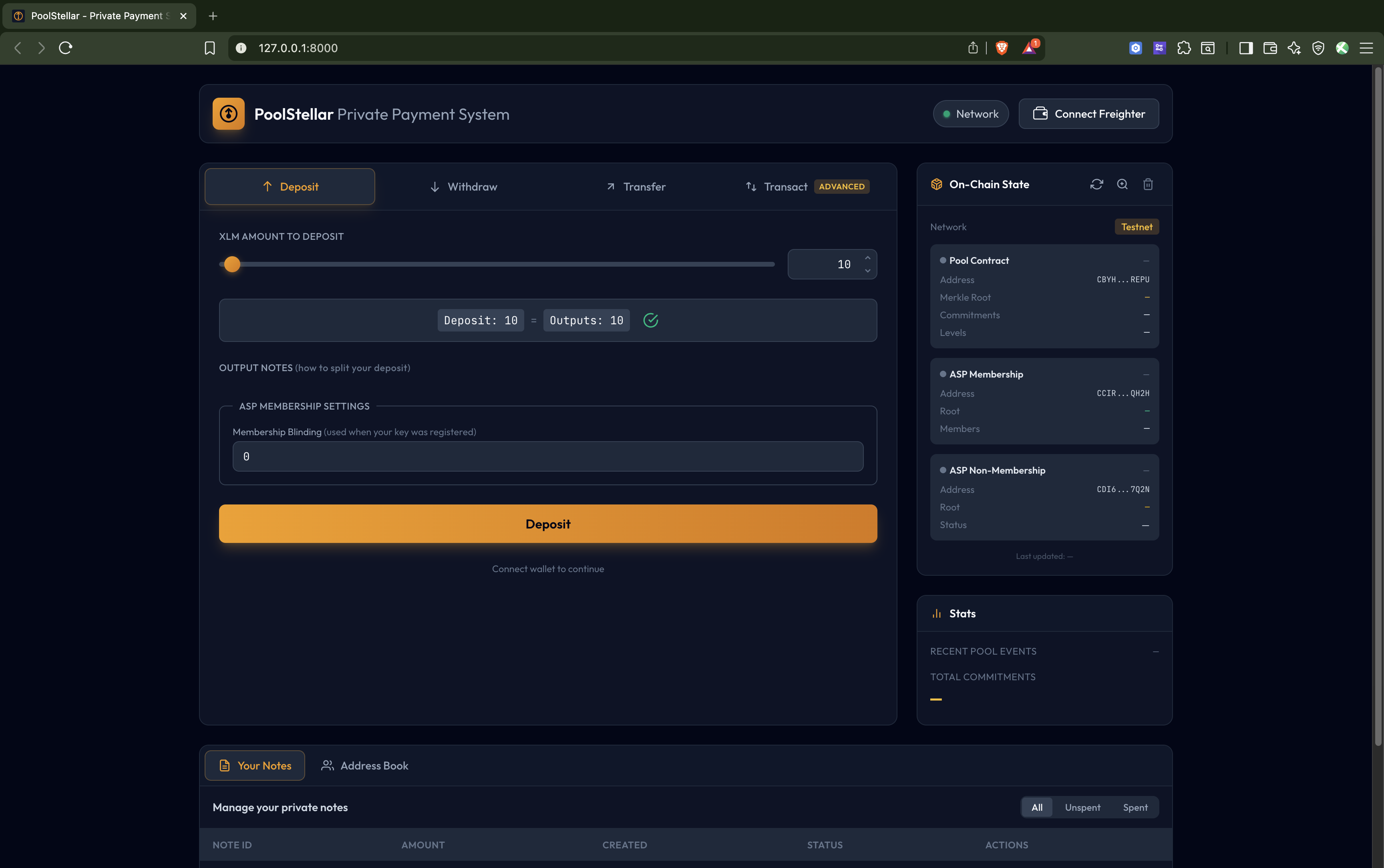
- Deposit: User deposits tokens into the pool, creating a commitment (UTXO). No input notes are spent, creates output notes.
- Withdraw: User proves ownership of commitments and withdraws tokens. Inputs notes are spent, no output notes are created.
- Transfer: User spends existing commitments and creates new ones, all done privately. Input notes are spent, and output notes under a new public key are created.
- Transact: Enables advanced users with experience on privacy-preserving protocols to generate their own transactions. Spending, creating and transferring notes at will.
ASP Admin Page
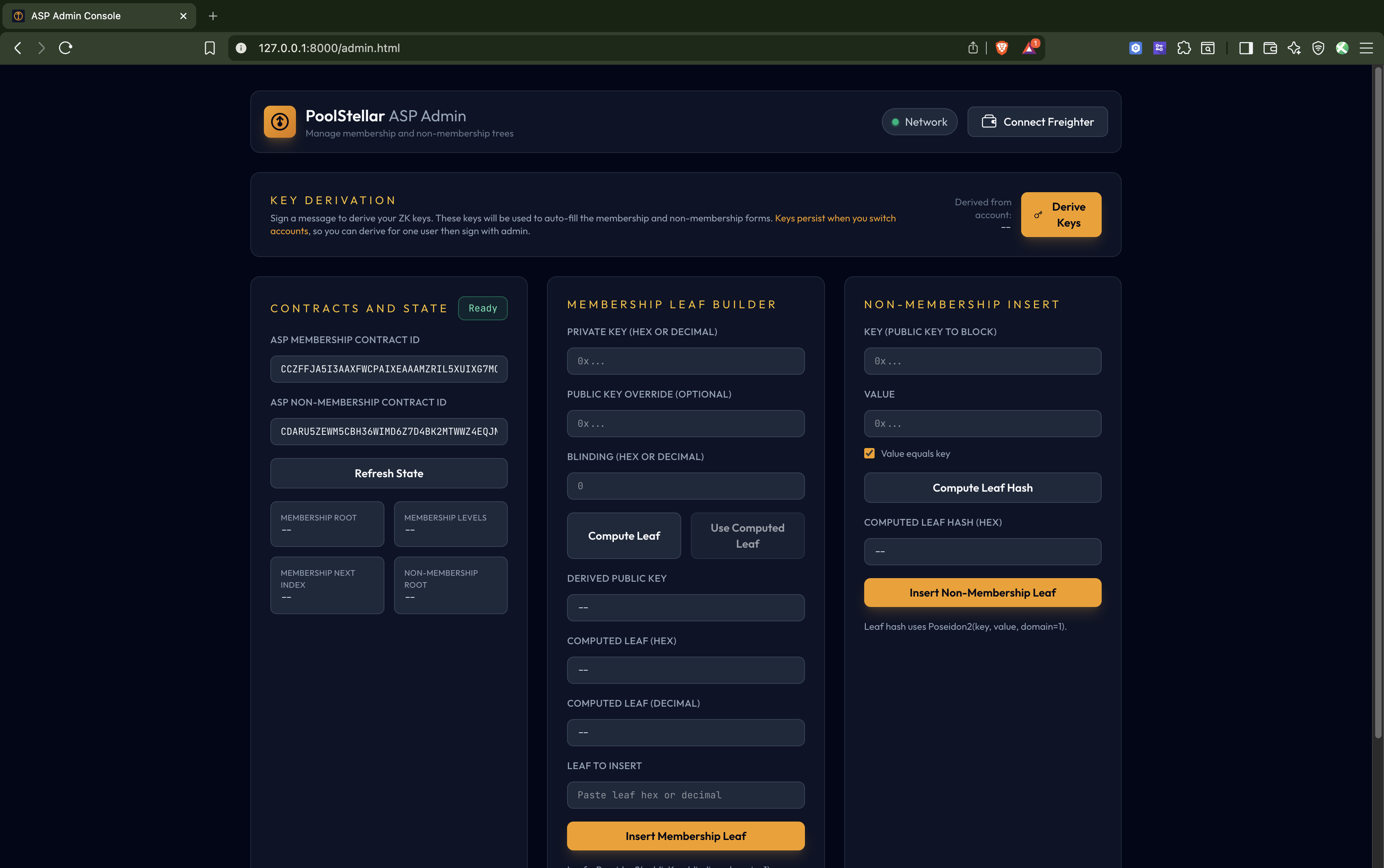
This is the administrative control panel for managing the Association Set Provider (ASP) membership trees. It allows you to:
- Add/insert public keys to the ASP membership tree - Controls which public keys are approved
- Manage the exclusion list - Block specific public keys via the non-membership Merkle tree
- Derive keys for accounts - Generate derived keys for any account (though insertion must be signed by the ASP admin account)
This provides illicit activity safeguards while maintaining user privacy. The ASP membership trees work with the zero-knowledge proofs to prove that deposits either belong to approved accounts or don’t belong to blocked accounts—without compromising privacy. To access the ASP Admin Page, go to http://localhost:8080/admin.html
The admin has the option of toggling the “Admin-Only Leaf Insert”, It’s enabled by default which restricts only the admin to insert membership leaves but when disabled by the admin, anyone can insert membership leaves.
WARNING: Disabling “Admin-Only Leaf Insert” removes the access-control safeguard on the ASP membership tree. Any party will be able to add themselves (or others) to the approved set without admin approval, bypassing the intended illicit-activity safeguards. Only disable this in a controlled demo or testing environment—never in production.
Zero-Knowledge Circuits
The main transaction circuit proves:
- Ownership of input UTXOs (knowledge of private keys)
- Correct nullifier computation (prevents double-spending)
- Valid Merkle proofs for input commitments
- Correct output commitment computation
- Balance conservation (inputs = outputs + public amount)
- ASP membership/non-membership proofs
Smart Contracts
- Pool: Main contract handling deposits, transfers, and withdrawals
- Circom Groth16 Verifier: On-chain verification of ZK proofs
- ASP Membership: Merkle tree of approved public keys
- ASP Non-Membership: Sparse Merkle tree for exclusion proofs
Limitations
As a proof of concept, this implementation has several limitations:
- No Groth16 Ceremony: The Common Reference String (CRS) was not generated doing a decentralized ceremony.
- Single circuit support: Now the demo only showcases a single circuit (2 inputs, 2 outputs). Support for multiple circuits might be added in the future.
- No Stellar Events: The demo relies heavily on Stellar events. But RPC nodes only store events for a small retention window (7 days). This means that the demo will not work for longer periods of time. It requires a dedicated indexer serving events to users.
- Decimal support: Demo supports Stroops, so it should be able to handle XLM deposits with decimal amounts. But this has not been tested in the UI.
- Not Audited: The code has not undergone security audits.
- Error Handling: Error handling may not cover all edge cases.
AI tools disclosure
The content published here may have been refined/augmented by the use of large language models (LLM), computer programs designed to comprehend and generate human language. However, any output refined/generated with the assistance of such programs has been reviewed, edited and revised by Nethermind.
License
This repository contains source code provided under a mixed license structure (Apache 2.0 and GPLv3).
Most of the source code is licensed under the Apache License, Version 2.0. See LICENSE for details.
The exception is circuits/build.rs which is licensed separately under the GNU Lesser General Public License v3.0. See circuits/LICENSE for details.
Responsibility of Deployers
The dist/ directory and its contents (including compiled WebAssembly circuits, keys, and bundled JavaScript) are generated artifacts produced by the build process. They are not checked into this repository.
If you compile, build, or deploy this project (e.g., hosting the dist/ folder on a web server), you become the distributor of those binary artifacts. It is your responsibility to:
- Ensure all generated artifacts comply with their respective licenses (specifically the LGPLv3 requirements for compiled circuits).
- Include the appropriate
LICENSEandNOTICEfiles in your deployment directory. - Make the source code available to your end-users as required by the LGPLv3 (if you are distributing the compiled circuits).
The maintainers of this repository provide the source code “as is” and assume no responsibility for the downstream builds or deployments.
Would like to contribute?
See Contributing.
Credit
Credit goes to Horizen Labs for their Poseidon2 implementation, which is integrated into this repository.
Contributor’s guide
Commit signing
Enable commit signing
git config commit.gpgsign true
Project Structure
stellar-private-transactions/
├── app/                        # Browser-based frontend application (See app/README.md for more information)
│   ├── crates/                 # Rust WASM modules
│   │   ├── prover/             # Groth16 proof generation
│   │   └── witness/            # Circom witness calculator
│   ├── js/                     # JavaScript frontend code
│   │   ├── state/              # State management (IndexedDB, sync) (see app/ARCHITECTURE.md for more information)
│   │   ├── ui/                 # UI components
│   │   └── *.js                # Core modules (bridge, wallet, stellar)
│   └── index.html              # Main application entry
├── circuits/                   # Circom ZK circuits
│   ├── src/
│   │   ├── poseidon2/          # Poseidon2 hash circuits
│   │   ├── smt/                # Sparse Merkle tree circuits
│   │   ├── test/               # Circuit test utilities
│   │   ├── policyTransaction.circom  # Main transaction circuit
│   │   └── *.circom            # Supporting circuits
│   └── build.rs                # Circuit compilation build script
├── contracts/                  # Soroban smart contracts
│   ├── asp-membership/         # ASP membership Merkle tree
│   ├── asp-non-membership/     # ASP non-membership sparse Merkle tree
│   ├── circom-groth16-verifier/# On-chain Groth16 proof verifier
│   ├── pool/                   # Main privacy pool contract
│   ├── soroban-utils/          # Shared utilities (Poseidon2, etc.)
│   └── types/                  # Shared contract types
├── e2e-tests/                  # End-to-end integration tests
├── poseidon2/                  # Poseidon2 hash implementation
├── scripts/                    # Deployment and utility scripts
│   ├── deploy.sh               # Contract deployment script
│   └── deployments.json        # Deployment output
└── Makefile                    # Build automation
Prerequisites
- Rust 1.92.0 or later (see
rust-toolchain.toml). - Circom 2.2.2 or later for circuit compilation.
- Stellar CLI for contract deployment.
- Node.js for frontend dependencies.
- Wasm-pack for building WASM modules.
- Trunk for serving the web application.
- Cargo Deny
- Typos
- Cargo Sort
Building and testing crates
Building Circuits
To explicitly build them:
# Build circuits
cargo build -p circuits
The circuit crate also exposes 2 flags:
- BUILD_TESTS: Builds the circom test circuits. Most Circom circuits simply define a template. And if you want to use it or test it, you need to instantiate it with some specific parameters.
For efficiency, the compilation of these circuits test is gatekeeped behind this flag. When enabled, if the verifying keys are not in
scripts/testdata, it will generate them. - REGEN_KEYS: Forces the generation of new verification keys, even if they already exist. Should not generally be used, as it might cause issues with deployed contracts.
Also, for efficiency reasons, some tests are ignored by default. To run them:
# Test circuits requires the flag to be enabled
BUILD_TESTS=1 cargo test -p circuits -- --ignored
Building Contracts
# Build all contracts
stellar contract build --manifest-path Cargo.toml --out-dir target/stellar --optimize --package pool
stellar contract build --manifest-path Cargo.toml --out-dir target/stellar --optimize --package asp-membership
stellar contract build --manifest-path Cargo.toml --out-dir target/stellar --optimize --package asp-non-membership
stellar contract build --manifest-path Cargo.toml --out-dir target/stellar --optimize --package circom-groth16-verifier

# Or use the deployment script which builds automatically
./scripts/deploy.sh --help
Deploying Contracts
You can use the script scripts/deploy.sh to deploy contracts to a Stellar network.
An example can be found in the Demo Application section..
See ./scripts/deploy.sh --help for all options.
End-to-End Tests
The E2E tests generate real Groth16 proofs and verify them, locally, using contracts and the Soroban-SDK. To run them:
cargo test -p e2e-tests
JavaScript Tests
cd app
npm test
Code quality assurance
Install a pre-push git hook:
git config core.hooksPath .githooks
App development
Prerequisites
- Node.js
- npm
- python3 (for the static server)
The whole app:
$ make install
$ make serve
The Rust part - check compilation
$ make wasm
Prepare a production build (TODO: enable optimizations and minification)
$ make dist
Security
Security
If you believe you have found a security vulnerability in any Nethermind-owned repository that meets CVE’s definition of a security vulnerability, please report it to us as described below. We ask you to please not publicly disclose any details of the vulnerability until we have had an opportunity to investigate and address it.
Reporting Security Issues
Please do not report security vulnerabilities through public GitHub issues.
Instead, please use GitHub’s report vulnerability tool to create a draft advisory. Please include as much information as you can provide (listed below) to help us better understand the nature and scope of the possible issue:
- Type of issue.
- Source files affected by the issue.
- Location of source code (tag/branch/commit or direct URL).
- Step-by-step instructions to reproduce the issue and any additional configuration that might be needed.
- Severity of the issue.
Fixes
We will release fixes for verified security vulnerabilities. We expect to publish vulnerabilities using GitHub security advisories.
Privacy Pool Browser Application
Disclaimer: This is a Proof of Concept (PoC) application intended for demonstration and research purposes only. It has not been audited and should not be used with real assets.
Browser-based zero-knowledge proof generation for private Stellar payments. This application allows users to interact with the privacy pool contracts directly from their browser, with client-side proof generation.
Features
- Support for deposits, transfers, and withdrawals
- Real-time synchronization with on-chain state
- Freighter wallet integration for Stellar transactions
- Client-side Groth16 proof generation via WebAssembly
- Local state management with IndexedDB
- Note encryption/decryption
- Simulation of ASP providers for testing
Architecture
Module Isolation
The application uses two separate WASM modules that communicate through data-only exchange:
┌─────────────────────────────────────────────────────────────────────┐
│                        Browser Runtime                              │
│                                                                     │
│  ┌──────────────────────┐         ┌──────────────────────────────┐  │
│  │   Witness Module     │         │      Prover Module           │  │
│  │                      │         │                              │  │
│  │  witness_calculator  │         │  Groth16 proof generation    │  │
│  │  from circom         │         │  Merkle tree operations      │  │
│  │                      │         │  Poseidon2 hashing           │  │
│  └──────────┬───────────┘         └──────────────┬───────────────┘  │
│             │                                    │                  │
│             │         Uint8Array                 │                  │
│             └──────────────────────>─────────────┘                  │
│                    (data only, no code linking)                     │
│                                                                     │
└─────────────────────────────────────────────────────────────────────┘
The bridge module (js/bridge.js) orchestrates this data exchange without creating a derivative work of either module.
Directory Structure
app/
├── crates/
│   ├── prover/                    # Rust prover module (WASM)
│   │   ├── src/
│   │   │   ├── lib.rs             # WASM entry point
│   │   │   ├── prover.rs          # Groth16 proof generation
│   │   │   ├── crypto.rs          # Poseidon2 hashing
│   │   │   ├── merkle.rs          # Merkle tree operations
│   │   │   ├── sparse_merkle.rs   # Sparse Merkle tree (SMT)
│   │   │   ├── encryption.rs      # Note encryption/decryption
│   │   │   ├── r1cs.rs            # R1CS constraint parser
│   │   │   ├── serialization.rs   # Field element serialization
│   │   │   └── types.rs           # Common types
│   │   └── Cargo.toml
│   │
│   └── witness/                   # Rust witness module (WASM)
│       ├── src/lib.rs             # Witness calculator bindings
│       └── Cargo.toml
│
├── js/
│   ├── state/                     # State management (see ARCHITECTURE.md)
│   │   ├── db.js                  # IndexedDB wrapper
│   │   ├── pool-store.js          # Pool state tracking
│   │   ├── notes-store.js         # User notes (UTXOs)
│   │   ├── asp-membership-store.js    # ASP membership state
│   │   ├── asp-non-membership-fetcher.js  # ASP non-membership
│   │   ├── public-key-store.js    # Public key registry
│   │   ├── note-scanner.js        # Event scanning for notes
│   │   ├── sync-controller.js     # State synchronization
│   │   └── utils.js               # State utilities
│   ├── ui/                        # UI components
│   │   ├── core.js                # Core UI utilities
│   │   ├── navigation.js          # Page navigation
│   │   ├── notes-table.js         # Notes display
│   │   ├── prover-ui.js           # Prover status UI
│   │   ├── sync-ui.js             # Sync status UI
│   │   ├── address-book.js        # Address book management
│   │   ├── contract-reader.js     # Contract state viewer
│   │   ├── templates.js           # HTML templates
│   │   ├── errors.js              # Error handling
│   │   └── transactions/          # Transaction UI
│   │       ├── deposit.js         # Deposit flow
│   │       ├── withdraw.js        # Withdraw flow
│   │       ├── transfer.js        # Transfer flow
│   │       └── transact.js        # Generic transaction
│   ├── bridge.js                  # Witness/Prover coordination
│   ├── prover-client.js           # Prover WASM interface
│   ├── stellar.js                 # Stellar SDK wrapper
│   ├── transaction-builder.js     # Transaction construction
│   ├── wallet.js                  # Freighter wallet integration
│   ├── worker.js                  # Web Worker for proving
│   └── ui.js                      # Main UI entry point
│
├── __tests__/                     # Jest tests
├── css/                           # Stylesheets
├── assets/                        # Static assets
├── index.html                     # Main application
├── admin.html                     # Admin interface
└── TECHNICAL_SPEC.md              # Technical specification
Building
Prerequisites
- Rust toolchain with
wasm32-unknown-unknowntarget - wasm-pack for WASM bundling
- Trunk for serving the application
- Node.js for JavaScript dependencies and testing
Build Commands
From the repository root:
# Install all dependencies
make install

# Build circuits (required the first time)
make circuits-build

# Build WASM modules and serve
make serve
This will:
- Build the witness WASM module
- Build the prover WASM module (via Trunk)
- Install npm dependencies
- Serve the application at
http://localhost:8080
Individual Build Steps
# Build witness WASM module only
make wasm-witness

# Build everything without serving
make build

# Clean build artifacts
make clean
Development
Running Tests
# Run JavaScript tests
npm test
Project Configuration
Trunk.toml- Trunk bundler configuration (at repository root)package.json- npm dependencies and scriptsbabel.config.cjs- Babel configuration for Jestjest.config.cjs- Jest test configuration
App Architecture: Local State Management
This document describes how the web application manages local state, including persistent storage, in-memory caches, and their relationships to on-chain data.
Overview
The app uses a layered state management architecture:
┌─────────────────────────────────────────────────────────────────┐
│                      StateManager (index.js)                    │
│                  Unified API for all state operations           │
├─────────────┬─────────────┬─────────────┬─────────────┬─────────┤
│  PoolStore  │ ASPMember-  │ NotesStore  │ PublicKey-  │ Sync-   │
│             │ shipStore   │             │ Store       │ Control │
├─────────────┴─────────────┴─────────────┴─────────────┴─────────┤
│                      IndexedDB (db.js)                          │
│                    Persistent Browser Storage                   │
└─────────────────────────────────────────────────────────────────┘
Please note that the ASP Non-membership it is not part of the architecture. This is because in the current implementation, the SMT is stored directly on-chain and we can simply query the contract.
Storage Layer
IndexedDB (db.js)
All persistent data is stored in IndexedDB under the database name poolstellar. The schema includes:
| Store Name | Key | Purpose | Indexes |
|---|---|---|---|
retention_config | rpcEndpoint | Caches RPC retention window detection | - |
sync_metadata | network | Tracks sync progress (cursors, last ledger) | - |
pool_leaves | index | Pool merkle tree leaves (commitments) | by_commitment |
pool_nullifiers | nullifier | Spent note nullifiers | - |
pool_encrypted_outputs | commitment | Encrypted note data for scanning | by_ledger |
asp_membership_leaves | index | ASP membership tree leaves | by_leaf |
user_notes | id (commitment) | User’s discovered/created notes | by_spent, by_owner |
registered_public_keys | address | Address book of public keys | by_ledger |
Domain Stores
Pool Store (pool-store.js)
Manages the privacy pool’s state including commitments, nullifiers, and encrypted outputs.
Persistent Data (IndexedDB):
pool_leaves: Leaf commitments forming the private pool Merkle tree.pool_nullifiers: Nullifier hashes marking spent notes.pool_encrypted_outputs: Encrypted note data for recipient scanning.
In-Memory Cache:
merkleTree: Live merkle tree instance on user-side.- Initialized from
pool_leaveson startup via cursor iteration. - Updated incrementally as new commitments are synced.
- Used for generating Merkle proofs for ZK circuits.
- Initialized from
The Merkle tree cache is critical for transaction building. Without it, users cannot generate proofs. We must make sure it is synced with the on-chain contract.
ASP Membership Store (asp-membership-store.js)
Manages the Association Set Provider (ASP) membership tree for membership and non-membership policy proofs.
Persistent Data (IndexedDB):
asp_membership_leaves: Sequential membership leaves with their roots
In-Memory Cache:
merkleTree: Live ASP membership tree instance- Same initialization pattern as pool store
- Verifies roots match on-chain state during sync
As it happens with pool-store.js Merkle tree. It must be up to date for proofs to work.
ASP Non-Membership Fetcher (asp-non-membership-fetcher.js)
Unlike other stores, this module fetches proofs on-demand from the contract rather than syncing locally.
No Persistent State - Queries the contract’s find_key function via simulateTransaction.
Non-membership proofs are not cached. Each transaction requiring a non-membership proof makes an RPC call.
Notes Store (notes-store.js)
Manages user notes and cryptographic keypair derivation.
Persistent Data (IndexedDB):
user_notes: User’s notes with amount, blinding, leaf index, spent status.
In-Memory State:
cachedEncryptionKeypair: X25519 keypair (populated after transactions, used by note scanning)cachedNoteKeypair: BN254 keypair (populated after transactions, used by note scanning)currentOwner: Active Stellar address for note filtering
Keypair Derivation: Keys are derived deterministically from Freighter wallet signatures:
- User signs message
"Privacy Pool Spending Key [v1]"→ derives BN254 note identity keypair - User signs message
"Sign to access Privacy Pool [v1]"→ derives X25519 encryption keypair
When are signatures prompted?
- Transactions (deposit/withdraw/transfer): Always prompt for both signatures. Keys are re-derived each time as a security measure ensuring user presence and consent.
- Note scanning during sync: Uses the in-memory cache if available. After a transaction derives keys, they’re cached so the subsequent sync can scan for notes without additional prompts.
The keypair cache only benefits the sync/note-scanning flow. Transactions intentionally re-derive keys each time. Cache is cleared on logout, account switch, or page refresh.
Public Key Store (public-key-store.js)
Maintains an address book of registered public keys in the pool contract for sending private transfers.
Persistent Data (IndexedDB):
registered_public_keys: Address → (encryptionKey, noteKey, ledger)
Enables finding recipient keys without on-chain queries. Falls back to on-chain search if not found locally.
Note Scanner (note-scanner.js)
Discovers notes addressed to the user by scanning encrypted outputs.
In-Memory State:
lastScannedLedger: Tracks scan progress to avoid re-scanning
Scanning Process:
- Fetches encrypted outputs from pool store (optionally from a specific ledger)
- Attempts decryption using user’s X25519 encryption private key
- Verifies commitment matches using note public key
- Saves discovered notes addressed to the user into notes store
The lastScannedLedger prevents redundant decryption attempts but is lost on page reload, triggering a full rescan.
Sync Controller (sync-controller.js)
Orchestrates blockchain synchronization for all stores.
Persistent Data (IndexedDB):
sync_metadata: Per-network tracking of:poolSync.lastLedger,poolSync.lastCursoraspMembershipSync.lastLedger,aspMembershipSync.lastCursorsyncBrokenflags for gap detection
In-Memory State:
isSyncing: Prevents concurrent sync operations- Event listeners for progress reporting
Sync Flow:
1. Check retention window (RPC can configure their event history, usually 7d)
2. Detect sync gap (compare lastSyncedLedger vs latestLedger)
3. If gap > retention window → mark sync as broken
4. Fetch Pool events → process commitments, nullifiers, public keys
5. Fetch ASP Membership events → process leaf additions
6. Optionally scan for notes and check spent status
7. Update sync metadata with new cursors
Cursors enable incremental sync.
If sync is broken (offline too long), historical events cannot be recovered from RPC.
This is a limitation already addressed in the root level README.md.
Retention Verifier (retention-verifier.js)
Detects and caches the RPC’s event retention window.
Persistent Data (IndexedDB):
retention_config: Cached detection result per RPC endpoint
Detection Logic:
- Try fetching events from 7 days ago.
- If fails, try 24 hours ago.
Determines the warning threshold for sync gaps. Users are warned when approaching the retention limit to prevent data loss.
Cache Relationships
┌──────────────────────────────────────────────────────────────────────┐
│                          On-Chain State                              │
│    Pool Contract       ASP Membership       ASP Non-Membership       │
└──────────┬──────────────────┬───────────────────────┬────────────────┘
           │ Events           │ Events                │ Direct Query
           ▼                  ▼                       ▼
┌────────────────────────────────────────┐  ┌──────────────────────────┐
│            Sync Controller             │  │ ASP Non-Membership       │
│  - Fetches events from both contracts  │  │ Fetcher (no local state) │
│  - Tracks cursors per contract         │  └──────────────────────────┘
└──────────┬──────────────────┬──────────┘
           │                  │
           ▼                  ▼
┌───────────────────┐  ┌───────────────────┐
│    Pool Store     │  │ ASP Membership    │
│  - IndexedDB      │  │ Store             │
│  - Merkle Tree    │  │  - IndexedDB      │
│    (in-memory)    │  │  - Merkle Tree    │
└─────────┬─────────┘  │    (in-memory)    │
          │            └───────────────────┘
          ▼
┌───────────────────┐     ┌───────────────────┐
│   Note Scanner    │────▶│    Notes Store    │
│  - Scan progress  │     │  - IndexedDB      │
│    (in-memory)    │     │  - Keypairs       │
└───────────────────┘     │    (in-memory)    │
                          └───────────────────┘
Data Flow Examples
Creating a Deposit
- User enters amount.
- App derives note keypair (from cache or Freighter signature).
- Transaction builder creates commitment using Poseidon2.
- Transaction submitted to Pool contract.
- Sync picks up
NewCommitmentEvent. - Pool store adds leaf to IndexedDB and Merkle tree.
- Notes store saves note.
Receiving a Transfer
- Sync fetches
NewCommitmentEventwith encrypted output. - Pool store saves encrypted output to IndexedDB.
- Note scanner attempts decryption with user’s X25519 key.
- If successful, verifies commitment with note public key.
- Saves note to notes store (marked as
isReceived: true).
Spending a Note
- User selects notes to spend.
- App fetches Merkle proof from pool store’s in-memory tree.
- App fetches ASP membership proof from ASP membership store.
- ZK proof generated with note private key.
- Transaction submitted with nullifier.
- Sync picks up
NewNullifierEvent. - Pool store records nullifier.
- Note scanner marks note as spent.
Recovery Scenarios
Clearing Browser Data
All IndexedDB data is lost. On next load:
- Full sync from RPC (limited by retention window).
- Merkle trees rebuilt from synced events.
- User must re-authenticate for keypair derivation.
- Note scanning rediscovers received notes.
- If events are older than retention window, they cannot be recovered.
Account Switch
clearKeypairCaches()called.setCurrentOwner()updated.- Notes filtered to new owner.
- User must re-authenticate (sign wallet messages) for note operations.
File Reference
| File | Responsibility |
|---|---|
state/index.js | StateManager facade, event forwarding |
state/db.js | IndexedDB wrapper, schema definition |
state/pool-store.js | Pool commitments, nullifiers, merkle tree |
state/asp-membership-store.js | ASP membership tree |
state/asp-non-membership-fetcher.js | On-demand non-membership proofs |
state/notes-store.js | User notes, keypair management |
state/public-key-store.js | Address book |
state/note-scanner.js | Encrypted output scanning |
state/sync-controller.js | Event synchronization orchestration |
state/retention-verifier.js | RPC retention window detection |
state/utils.js | Hex/bytes conversion, tree utilities |
API Reference
Detailed API documentation generated from source code via rustdoc.